Search This Blog

Thursday, June 10, 2010

Search Engine Optimization (SEO) Enhancement in ASP.NET 4.0


As we all of know Meta description (META description tag) is very significant for SEO point of view. The META Description Tag is a vital part which identifies a page and search engines take this META tag very sincerely. To improve the search relevancy of pages is to make sure you always put relevant “keywords” and “description” <meta> tags within the<head> section of your HTML.

<head runat="server">
    <title>SEO Demo</title>
    <meta name="description" content="Page keywords." />
    <meta name="keywords" content="ASP.NET 4, SEO enhancements." />
</head>
In ASP.NET 4.0, one of the notable enhancements is the addition of two new properties to the Page class:- MetaKeywords and MetaDescription. These put the “keywords” and “description” <meta> tags within the <head> section of the page automatically.

When Useful?

This is particularly useful where your web site are using master-pages – and the section ends up in a .master file. You can now set the new MetaKeywords andMetaDescription properties in the .aspx page and their values will be automatically rendered by the section within the master page.

Using MetaKeywords and MetaDescription properties

You can directly define Meta Keywords and Meta Description through @Page attribute as-

 
Or you can also define the same programmatically in the Page_Load event of the Page class as-

protected void Page_Load(object sender, EventArgs e)
    {
        this.Page.MetaKeywords = "Page key words";
        this.Page.MetaDescription = "Page description";
    }
From both of the above options, the markup gets rendered in the web browser as-

<head>
   <title>SEO Demo</title>
   <meta name="description" content="Page description" />
   <meta name="keywords" content="Page key words" />
</head>
One important point should be noted that if you set the values programmatically, values set declaratively in either the section or via the @Page attribute will be overridden.
If you want to update the meta tag content by keeping the old content intact, use following technique-

protected void Page_Load(object sender, EventArgs e)
    {
        this.Page.MetaKeywords += " - NewPage key words.";
        this.Page.MetaDescription += " - New Page description.";
    }
And now the markup that gets rendered in the web browser is-

<head>
   <title>SEO Demo</title>
   <meta name="description" content="Page description - New Page description."/>
   <meta name="keywords" content="Page key words - NewPage key words." />
</head>

Winding Up

So this is really a nice enhancement in ASP.NET 4.0 that provide us more flexibilities in defining meta tag contents.

Thursday, May 6, 2010

Script#

Script# allows programming against the DHTML DOM APIs and JavaScript APIs, as well as Silverlight 1.0 script API. The compiler itself isn’t coupled to any one particular framework. You can use Script# to program against Microsoft ASP.NET Ajax as well as other 3rd party frameworks such as ExtJS (via Ext#). At the same time, the compiler is complemented by an optional ScriptFX framework, which is a small framework built using Script# itself. Finally, if you have existing scripts, they can be imported and then used from new C# code so you don’t have to rewrite everything from scratch to start using Script#.

Scripts generated using Script# are honest-to-goodness plain old JavaScript files, that you can freely deploy into your applications, and there is no runtime dependency on the Script# compiler. You will need .NET 2.0+ and/or Visual Studio on your development machine. You can also use Visual C# Express which is available for free.

Productivity and better tooling are primary motivators behind Script#. At the same time, a fundamental design tenet and driving philosophy behind the design of Script# is to produce script that resembles hand-written script that is aware and faithful to the script runtime environment found in browsers. Specifically the compiler does not introduce unnecessary layers of abstraction or indirection. The idea is you’re simply writing script in a better and pragmatic way, rather than trying to port a .NET application to the browser, which is more likely to produce impractical results.


What you can build with Script# ProjectAjax Applications – Script# allows you to implement the Ajax code for your pages and mashups using a choice of frameworks. (see tutorial)
Ajax Frameworks and Components – Script# allows you to create reusable script libraries and components that can be consumed during further application development using either Script# or via direct JavaScript as well.
ASP.NET Ajax Server Controls – Script# can be used to develop script libraries containing components such as controls and behaviors that can then be embedded into server controls and control extenders.
Sidebar Gadgets – Script# can be used to program gadgets for Windows Vista by referencing the Gadget APIs, RSS Feed APIs and File System APIs in addition to the default DHTML DOM APIs. (see tutorial)


Script# Roadmap
The Script# project has been an on-going piece of work. The following are on the list for a v1 release during 2009 beyond what is available in the current and latest build:

Unit testing support
jQuery support
High priority bug fixes and improved Visual Studio integration
Longer term, there are a number of additional features on the roadmap such as:

Support for generics
Support for static linking and other script optimizations
Support for additional script APIs and scenarios
Besides features, the plan is to open source the Script# project following the v1 release

Tuesday, April 27, 2010

Cloud Computing - Architecture


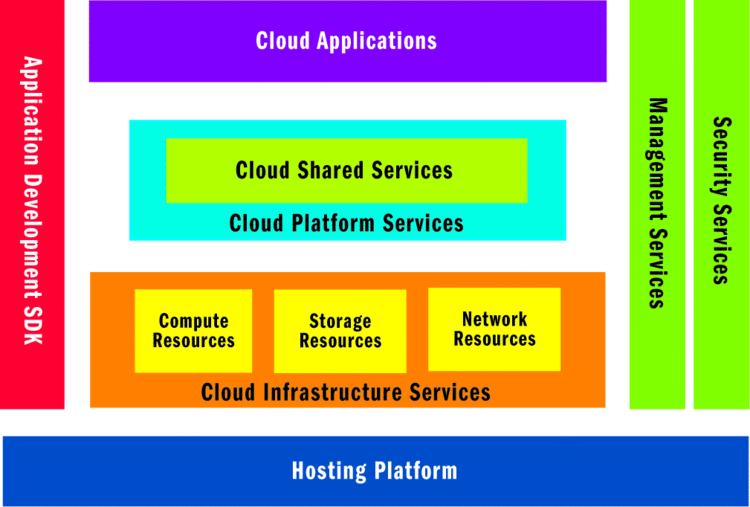
A cloud computing platform enables applications to be hosted in an Internet-accessible virtual environment that supplies the necessary hardware, software, network, and storage capacities and provides for security and reliability, removing much of the burden of purchasing and maintaining hardware and software in-house. In the cloud, you can develop, deploy, and manage applications as you have in the past and integrate these services to your on-premise applications. You pay only for the time, resources, and capacity you use while scaling up to accommodate the changing business needs.
In this article, I will examine the typical cloud platform architecture and some common architectural patterns, along with their implementation on the Windows Azure offering from Microsoft.

For more info..