Sunday, November 28, 2010


Saturday, October 30, 2010
What’s Next in C#?
Microsoft announced the Visual Studio Async CTP, which shows one of the major features Microsoft plan to include in a future release of C# and Visual Basic.
This feature makes development of asynchronous applications--which include everything from desktop applications with responsive UI to sophisticated web applications--much easier.
The future release will introduce two new keywords to the C# language: await and async. The await keyword is used to mark asynchronous calls, so that you don’t need to create callback functions anymore and can write code in the same way as if it were synchronous. The compiler will do all of the heavy lifting for you. The async keyword must be presented in the signature of the method that makes asynchronous calls. Briefly, you can use the await keyword only if the async keyword is in the method signature. The same is true for lambda expressions.
Let us wait and see....
Monday, October 25, 2010
Service Oriented HTML Application (SOHA)
Service Oriented HTML Application's:
SOHA decouples the front end from service, backend service is presentation agnostic business logics and provides data access, web server serves static HTML/CSS/JavaScript/Assets files without any server pages generating HTML, and on the client side, DOM is built out based on Ajax data, creating rich interactivities without the dependency on browser plugin.
It shows the power of jQuery to creating and changing different user preferences and layout/themes without the help of server page (ASP, ASP.NET MVC, JSP, PHP, Ruby on Rails, ColdFusion, etc.), it dynamically loads HTML, CSS and JavaScript at runtime on demand. These are the fundamentals for building SOHA - Service Oriented HTML Application - all by static files on the web server.
Since there is no role reserved for server page technologies and client browser plugin in SOHA.
Key concepts and principles of SOHA are:
- High scalability web tier: no HTML generated from server, web tier just serves static files;
- Maximize application reach-ness: no dependency on browser plug-ins, open to next generation of web standards (HTML5, CSS3, etc.), accessible by all browsers and internet-enabled devices;
- Services logic and data access tier stay presentation agnostic;
- Leverage client side processes: application views will be generated in the client, no server side application logic needed for presentation tier, rich visuals and inter activities are enabled by web standards
- SOA: all dynamic data are retrieved from data service via Ajax, client/server interaction are performed by Ajax calls rather than post back to page itself;
- Clean separation of concerns: service logic just focus on business logic rather than rendering needs; Web server just serves static HTML/CSS/JS files; client side controller (JS) handles user inter activities and Ajax calls, also manipulates DOM; all application Views are controlled by CSS and static HTML serves as model template;
- Simplified Application common tasks: dynamic CSS/scripts/HTML loading, secure static HTML based navigation, static page book marking and redirecting, page to page data transferring, extends Ajax API, etc.
Friday, October 1, 2010
Partitioning in SQL Server 2008
Hi friends,
I came across one good article regarding table partition and I would like to share the same...
http://www.sqlservercentral.com/articles/partition/64740/
I came across one good article regarding table partition and I would like to share the same...
http://www.sqlservercentral.com/articles/partition/64740/
Sunday, September 26, 2010
Architecture : Design pattern : Model View Controller vs Model View Presenter vs Model View View Model [WPF]
MVC vs. MVP vs. MVVM
An important FAQ. The answer actually depends on where the person is coming from. MVC is a fundamental pattern which has been tweaked quite a bit to fit into various platforms. For instance if you had asked anybody how to implement an MVC in ASP.NET (prior to release of ASP.NET MVC framework) you would get very different answers. So let’s start with basic. The common motivation behind all 3 is separation of concerns, cutting flab from UI (good for UI designers), swapping UIs (for instance windows to web), make UI easy for Unit Testing, etc. Have a look at the below diagram, I have taken it from CAB documentation.

MVC: Three components – View (your UI), Model (your business entities / data – that view is displaying) & Controller (contains the logic that alters the model depending on the action triggered by UI, typically implementing a Use Case). It’s widely known that MVC is a compound pattern (View and Controller have Strategy implementation, View itself can be a Composite implementation & View and Model are synched through Observer). In this case Controller doesn’t know anything about View, and the idea is that a View can switch Controllers (for instance depending upon who has logged to the system) & a single controller can be used by multiple Views. View subscribes to the changes done to the model & hence both are sync from the data perspective. One of the disadvantages of MVC is that it’s difficult to unit test. Controller manipulates the data but how about asserting those changes from a view perspective. For instance on click of a button you raise an event to controller, and controller modifies the value in model. This value modification changes the font size / color in View. Unit testing this scenario is slightly difficult in MVC.
MVP: Again three components. But dependencies change (look at arrows in the diagram). Over here we replace Controller with Presenter (one which presents the changes done in model back to view). The main difference between both is that Presenter refers back to the view while Controller doesn’t. Normal pattern found here is to create an abstraction of the View (in terms of properties / events) & Presenter refers to it. This makes the mocking of View much easier & hence the Unit Testing aspect. Presenter here hence takes the responsibility of not only manipulating model but also updating the view. Of course the implementations of MVP differ in real world in terms of how much thin the view is, some prefer keeping basic logic still inside view & taking complex logic in presenter, while others prefer keeping the entire logic in Presenter. Martin fowler describes 2 variations on MVP on these lines namely – Supervising Controller & Passive View described below
(A Passive View handles this by reducing the behavior of the UI components to the absolute minimum by using a controller that not just handles responses to user events, but also does all the updating of the view. This allows testing to be focused on the controller with little risk of problems in the view.
Supervising Controller uses a controller both to handle input response but also to manipulate the view to handle more complex view logic. It leaves simple view behavior to the declarative system, intervening only when effects are needed that are beyond what can be achieved declaratively.)

MVVM: Model–View-ViewModel talks of creating a new model (in addition to your domain model). This model normally adds additonal properties from the prespective of View (as we understand that View has controls in addition to data which it’s displaying). For instance if View had a property IsChecked and Presenter was setting in classic MVP, in MVVM Presenter will have that IsChecked Property which View will sync up with (doesn’t it look like Strategy pattern has been replaced with Observer?). So now a Presenter becomes more like a combo of – View Properties & Model properties which would be synchronized with View. So why not rename Presenter to ViewModel? Do that and you get MVVM. MVVM is attractive for platforms which support bi-directional binding with less effort. Also a minor tradeoff is ViewModel unlike Presenter can stand on its own (Presenter normally requires a View’s interface). Martin fowler describes similar pattern called Presentation Model & Josh Smith captures MVVM implementation for WPF / Silverlight in this article.
ASP.NET MVC: So what has MVC got to do with ASP.NET MVC? First, Web works on a different model. Here, user interacts with HTML in browser and send a request back to the server for processing (for client side Ajax you might go just for data). As the interaction is normally stateless, when the request comes back to the server we need to recreate our View, load the model back & manipulate both of them as required. There are 2 variations on how handle this recreation – Page Controller & Front Controller. Make Page the decision maker – in this widely implemented pattern HTTP request is specific to physical page on server (.aspx for instance) & page in turn creates itself (builds the view from postback data) decides what model it needs and triggers the manipulation (events in codebehind file) it requires. As you see here the distinction between View & Controller becomes blur & is little difficult to separate. This where ASP.NET MVC comes in which behaves like a Front Controller – where Controller is the decision maker. Here all HTTP requests are mapped to methods on the Controller Class. Controller class recreates the model & view as required and does the manipulations. This makes unit testing easier as we can directly instantiate the front controller class & invoke methods on it to perform the assertions.
I can add code snippets to above explanations if you feel they would help you understand things better. I will look forward to your comments .
An important FAQ. The answer actually depends on where the person is coming from. MVC is a fundamental pattern which has been tweaked quite a bit to fit into various platforms. For instance if you had asked anybody how to implement an MVC in ASP.NET (prior to release of ASP.NET MVC framework) you would get very different answers. So let’s start with basic. The common motivation behind all 3 is separation of concerns, cutting flab from UI (good for UI designers), swapping UIs (for instance windows to web), make UI easy for Unit Testing, etc. Have a look at the below diagram, I have taken it from CAB documentation.
MVC: Three components – View (your UI), Model (your business entities / data – that view is displaying) & Controller (contains the logic that alters the model depending on the action triggered by UI, typically implementing a Use Case). It’s widely known that MVC is a compound pattern (View and Controller have Strategy implementation, View itself can be a Composite implementation & View and Model are synched through Observer). In this case Controller doesn’t know anything about View, and the idea is that a View can switch Controllers (for instance depending upon who has logged to the system) & a single controller can be used by multiple Views. View subscribes to the changes done to the model & hence both are sync from the data perspective. One of the disadvantages of MVC is that it’s difficult to unit test. Controller manipulates the data but how about asserting those changes from a view perspective. For instance on click of a button you raise an event to controller, and controller modifies the value in model. This value modification changes the font size / color in View. Unit testing this scenario is slightly difficult in MVC.
MVP: Again three components. But dependencies change (look at arrows in the diagram). Over here we replace Controller with Presenter (one which presents the changes done in model back to view). The main difference between both is that Presenter refers back to the view while Controller doesn’t. Normal pattern found here is to create an abstraction of the View (in terms of properties / events) & Presenter refers to it. This makes the mocking of View much easier & hence the Unit Testing aspect. Presenter here hence takes the responsibility of not only manipulating model but also updating the view. Of course the implementations of MVP differ in real world in terms of how much thin the view is, some prefer keeping basic logic still inside view & taking complex logic in presenter, while others prefer keeping the entire logic in Presenter. Martin fowler describes 2 variations on MVP on these lines namely – Supervising Controller & Passive View described below
(A Passive View handles this by reducing the behavior of the UI components to the absolute minimum by using a controller that not just handles responses to user events, but also does all the updating of the view. This allows testing to be focused on the controller with little risk of problems in the view.
Supervising Controller uses a controller both to handle input response but also to manipulate the view to handle more complex view logic. It leaves simple view behavior to the declarative system, intervening only when effects are needed that are beyond what can be achieved declaratively.)
MVVM: Model–View-ViewModel talks of creating a new model (in addition to your domain model). This model normally adds additonal properties from the prespective of View (as we understand that View has controls in addition to data which it’s displaying). For instance if View had a property IsChecked and Presenter was setting in classic MVP, in MVVM Presenter will have that IsChecked Property which View will sync up with (doesn’t it look like Strategy pattern has been replaced with Observer?). So now a Presenter becomes more like a combo of – View Properties & Model properties which would be synchronized with View. So why not rename Presenter to ViewModel? Do that and you get MVVM. MVVM is attractive for platforms which support bi-directional binding with less effort. Also a minor tradeoff is ViewModel unlike Presenter can stand on its own (Presenter normally requires a View’s interface). Martin fowler describes similar pattern called Presentation Model & Josh Smith captures MVVM implementation for WPF / Silverlight in this article.
ASP.NET MVC: So what has MVC got to do with ASP.NET MVC? First, Web works on a different model. Here, user interacts with HTML in browser and send a request back to the server for processing (for client side Ajax you might go just for data). As the interaction is normally stateless, when the request comes back to the server we need to recreate our View, load the model back & manipulate both of them as required. There are 2 variations on how handle this recreation – Page Controller & Front Controller. Make Page the decision maker – in this widely implemented pattern HTTP request is specific to physical page on server (.aspx for instance) & page in turn creates itself (builds the view from postback data) decides what model it needs and triggers the manipulation (events in codebehind file) it requires. As you see here the distinction between View & Controller becomes blur & is little difficult to separate. This where ASP.NET MVC comes in which behaves like a Front Controller – where Controller is the decision maker. Here all HTTP requests are mapped to methods on the Controller Class. Controller class recreates the model & view as required and does the manipulations. This makes unit testing easier as we can directly instantiate the front controller class & invoke methods on it to perform the assertions.
I can add code snippets to above explanations if you feel they would help you understand things better. I will look forward to your comments .
Thursday, July 15, 2010
Visual Studio 2010 Express for Windows Phone Released
Earlier today we shipped the beta of the Windows Phone 7 Developer Tools. You can download them here.

What is included in the Windows Phone Developer Tools
The Windows Phone Developer Tools Beta includes:
- Visual Studio 2010 Express for Windows Phone – a new free, express edition of Visual Studio 2010
- Express Blend for Windows Phone – a new free, edition of Blend focused on Windows Phone 7 development
- Silverlight for Windows Phone 7
- XNA Game Studio for Windows Phone 7
Integrated with the development tools is a phone emulator that enables you to easily develop and test Windows Phone 7 applications on your laptop or desktop machine – without requiring a phone device. It is hardware accelerated, supports multi-touch events on multi-touch capable monitors, and provides a really easy way to debug and try out your phone applications.
Devices for Developers
In addition to testing applications within the emulator, we are also this month starting to ship pre-release phones to developers. You can learn more about this program and sign-up to receive one from this blog post from the Windows Phone 7 team.
Tuesday, July 6, 2010
Entity Framework and [Tier & Layer]
First understand...Different between Layers and tiers

EF takes you to create or infer an abstract model (the EDMX file) based on which the visual designer will actually create source files for recognized entities and relationships. In v1, you had no control over the generation of files. The auto-generated files define classes that inherit from EF provided classes thus leaving the entire object model dependent on the Entity Framework assemblies.
When EF auto-generates source code for entities in the model it puts in the same layer entities and the gateway object to the persistence layer. As I see things, this is an even bigger issue. EF4 doesn't solve it in a clear way; it only leaves you some room for manipulating the project so that entities and gateway object (the object context class) end up in distinct assemblies you can deploy to distinct tiers if necessary. The following class does logically belong to the data access layer, not to the business layer.

Figure 1 shows a Visual Studio solution made of two distinct assemblies - Model and DAL - built from the same source EDMX designer file. The Model assembly incorporates the EDMX item and the POCO artifact item generator. (Same if you use Self-tracking entities.) The item generator produces two T4 template files - context and entities. The T4 template for the context produces the object context object specific for the model; the other T4 template produces the entity classes. By default, both T4 templates belong to the same assembly. To keep them separate - entities are business, context is DAL - create a new project for the DAL and add to it the existing context T4 file as a link. You choose "Add existing item" from the project context menu, locate the context T4 file and add it as a link, as in Figure 2.

Visual Studio will process again the T4 template and add auto-generated files to the current project.
It turns out that Entity Framework oversimplifies the creation of layered applications mixing together elements that logically belongs to the data access layer with entities which clearly belong to the business layer.
Before going any further, though, let me clarify the difference that exists between two terms that are sometimes used interchangeably - layer and tier.
Not that using layer and tier interchangeably is a mistake per se in all situations - and, frankly, I often use these terms as they were synonyms. Fact is, however, they are not synonyms.
A layer refers to pieces of software that are logically separated, but typically live within the same process and machine.
A tier, instead, refers to pieces of software that live in distinct processes or AppDomains or machines. You can allocate a layer on a tier but not vice versa. You can have multiple layers on the same tier. A tier refers to physical separation; a layer is about logical separation. So if you take it literally a business tier is a distinct server where you run the code that forms the business logic.
Hope you understand... Click below .. to earn more....
So the Entity Framework Project...
Entity Framework is often presented as an O/RM tool. Not certainly a wrong statement, but there's more I believe. My idea is that EF was not devised to be a classic O/RM like NHibernate and other commercial tools. The point here is not determining whether this was the right or wrong approach; fact is, that in my opinion the word "framework" says a lot about the original intentions and the changes introduced on the fly with EF4.EF takes you to create or infer an abstract model (the EDMX file) based on which the visual designer will actually create source files for recognized entities and relationships. In v1, you had no control over the generation of files. The auto-generated files define classes that inherit from EF provided classes thus leaving the entire object model dependent on the Entity Framework assemblies.
When EF auto-generates source code for entities in the model it puts in the same layer entities and the gateway object to the persistence layer. As I see things, this is an even bigger issue. EF4 doesn't solve it in a clear way; it only leaves you some room for manipulating the project so that entities and gateway object (the object context class) end up in distinct assemblies you can deploy to distinct tiers if necessary. The following class does logically belong to the data access layer, not to the business layer.
This means that when you use EF to create the assembly for the domain logic and entities you should manage to move this class to a distinct project. Just impossible to do in EF1, this can be done only with some tricks in EF4 and only if you choose to go with POCO or self-tracking entities. (See Figure 1.)
Figure 1: A project where EF context object has been moved to the DAL project.
Figure 1 shows a Visual Studio solution made of two distinct assemblies - Model and DAL - built from the same source EDMX designer file. The Model assembly incorporates the EDMX item and the POCO artifact item generator. (Same if you use Self-tracking entities.) The item generator produces two T4 template files - context and entities. The T4 template for the context produces the object context object specific for the model; the other T4 template produces the entity classes. By default, both T4 templates belong to the same assembly. To keep them separate - entities are business, context is DAL - create a new project for the DAL and add to it the existing context T4 file as a link. You choose "Add existing item" from the project context menu, locate the context T4 file and add it as a link, as in Figure 2.
Figure 2: Adding an existing item as a link.
Visual Studio will process again the T4 template and add auto-generated files to the current project.
It turns out that Entity Framework oversimplifies the creation of layered applications mixing together elements that logically belongs to the data access layer with entities which clearly belong to the business layer.
Summary
Is everything wrong with EF, even in version 4? EF4 is significantly better than v1 and for a number of reasons. At the end of the day, there begin to be features in EF4 that, properly used, can enable some sort of tool-assisted, domain-driven design in .NET. These features, however, are not yet fully integrated in the designer and the framework itself. I'm referring to the T4 machinery discussed earlier but also to the upcoming Code First feature. EF1 could be used only in a very limited number of realistic scenarios. EF4 is much more widely usable, but you need to be aware of a number of things and pay attention to place the right boundaries between your layers and tiers. Looking forward for the next EF...Wednesday, June 23, 2010
Multi-Tier Architecture !!


When talking about multi-tiered architectures, we need to remember that the tier boundary is significant. The tier boundary is where distribution happens and if you remember the “fallacies of distributed computing “, you know not to take that lightly.
“, you know not to take that lightly.A tier is a physical boundary (versus, for example, an Edge in a SOA which is a logical boundary within the service). The implications of that are numerous. For instance, you need to consider:


- Trust–who do you let in?
- Security–what do you send out?
- Performance–you need to serialize to pass the boundary, and remote data is expensive to fetch.
- Availability–what happens if you crash?
- Manageability–can anyone see what’s your state? Help you recover?
- Temporal coupling–can you afford to make synchronous calls?
- and many similar questions.
Yet many times people think passing a tier is as simple as passing a logical layer. I should know. I made this stupid mistake more than 4 years ago in one of the first distributed systems I designed when I was work in Benchmark Softec Pvt LTD. I planned this beautiful separation of the UI controls from the business logic (I didn’t know it was called “MVC” and that someone else had figured it out ages ago, so I was pretty proud of myself). When you clicked on a button you just used metadata to say that BL should catch it. I had all this wonderful “infrastructure”that handled passing the call to its destination.


But then we wanted to take this n-layer application and put the BL in an “application server” which will handle multiple clients. Oh–now we need to move events over the wire , handle calls from multiple unrelated clients, pass a lot of data back and forth, and what about security… you can imagine the fiasco.
Thus, as Niels Bohr once said, “An expert is a person who has made all the mistakes which can be made in a very narrow field.” But you don’t have to make the same mistakes. Just remember that a tier is a natural boundary. You know what? You should think of a tier as the edge of a cliff, right there – at the end of your application. You know you want to be careful and not fall down.
Thursday, June 17, 2010
What is Denali ? - SQL Server 2011
“What is Denali?”
Denali is code name of SQL Server 2011.
Here is the list of the code name of other versions of SQL Server.
In 1988, Microsoft released its first version of SQL Server. It was developed jointly by Microsoft and Sybase for the OS/2 platform.
- 1993 – SQL Server 4.21 for Windows NT
- 1995 – SQL Server 6.0, codenamed SQL95
- 1996 – SQL Server 6.5, codenamed Hydra
- 1999 – SQL Server 7.0, codenamed Sphinx
- 1999 – SQL Server 7.0 OLAP, codenamed Plato
- 2000 – SQL Server 2000 32-bit, codenamed Shiloh (version 8.0)
- 2003 – SQL Server 2000 64-bit, codenamed Liberty
- 2005 – SQL Server 2005, codenamed Yukon (version 9.0)
- 2008 – SQL Server 2008, codenamed Katmai (version 10.0)
- 2010 – SQL Server 2008 R2, Codenamed Kilimanjaro (aka KJ)
- Next – SQL Server 2011, Codenamed Denali
Any guesses what should be the next version after 2011 should be codenamed?
Thursday, June 10, 2010
Windows Azure Platform Training Kit - June Update..
Windows Azure Platform Training Kit - June Update
Let us see.. How it is........
Here is what is new in the kit:
- Introduction to Windows Azure - VS2010 version
- Introduction To SQL Azure - VS2010 version
- Introduction to the Windows Azure Platform AppFabric Service Bus - VS2010 version
- Introduction to Dallas - VS2010 version
- Introduction to the Windows Azure Platform AppFabric Access Control Service - VS2010 version
- Web Services and Identity in the Cloud
- Exploring Windows Azure Storage VS2010 version + new Exercise: “Working with Drives”
- Windows Azure Deployment VS2010 version + new Exercise: “Securing Windows Azure with SSL”
- Minor fixes to presentations – mainly timelines, pricing, new features etc.
Search Engine Optimization (SEO) Enhancement in ASP.NET 4.0
As we all of know Meta description (META description tag) is very significant for SEO point of view. The
META Description Tag is a vital part which identifies a page and search engines take this META tag very sincerely. To improve the search relevancy of pages is to make sure you always put relevant “keywords” and “description” <meta> tags within the<head> section of your HTML.<head runat="server">
<title>SEO Demo</title>
<meta name="description" content="Page keywords." />
<meta name="keywords" content="ASP.NET 4, SEO enhancements." />
</head>In ASP.NET 4.0, one of the notable enhancements is the addition of two new properties to the
Page class:- MetaKeywords and MetaDescription. These put the “keywords” and “description” <meta> tags within the <head> section of the page automatically.When Useful?
This is particularly useful where your web site are using master-pages – and the section ends up in a .master file. You can now set the new
MetaKeywords andMetaDescription properties in the .aspx page and their values will be automatically rendered by the section within the master page.Using MetaKeywords and MetaDescription properties
You can directly define Meta Keywords and Meta Description through
@Page attribute as- Or you can also define the same programmatically in the
Page_Load event of the Page class as-protected void Page_Load(object sender, EventArgs e)
{
this.Page.MetaKeywords = "Page key words";
this.Page.MetaDescription = "Page description";
}From both of the above options, the markup gets rendered in the web browser as-
<head>
   <title>SEO Demo</title>
   <meta name="description" content="Page description" />
   <meta name="keywords" content="Page key words" />
</head>
One important point should be noted that if you set the values programmatically, values set declaratively in either the section or via the @Page attribute will be overridden.
If you want to update the meta tag content by keeping the old content intact, use following technique-
protected void Page_Load(object sender, EventArgs e)
    {
        this.Page.MetaKeywords += " - NewPage key words.";
        this.Page.MetaDescription += " - New Page description.";
    }
And now the markup that gets rendered in the web browser is-
<head>
   <title>SEO Demo</title>
   <meta name="description" content="Page description - New Page description."/>
   <meta name="keywords" content="Page key words - NewPage key words." />
</head>
Winding Up
So this is really a nice enhancement in ASP.NET 4.0 that provide us more flexibilities in defining meta tag contents.
Thursday, May 6, 2010
Script#
Script# allows programming against the DHTML DOM APIs and JavaScript APIs, as well as Silverlight 1.0 script API. The compiler itself isn’t coupled to any one particular framework. You can use Script# to program against Microsoft ASP.NET Ajax as well as other 3rd party frameworks such as ExtJS (via Ext#). At the same time, the compiler is complemented by an optional ScriptFX framework, which is a small framework built using Script# itself. Finally, if you have existing scripts, they can be imported and then used from new C# code so you don’t have to rewrite everything from scratch to start using Script#.
Scripts generated using Script# are honest-to-goodness plain old JavaScript files, that you can freely deploy into your applications, and there is no runtime dependency on the Script# compiler. You will need .NET 2.0+ and/or Visual Studio on your development machine. You can also use Visual C# Express which is available for free.
Productivity and better tooling are primary motivators behind Script#. At the same time, a fundamental design tenet and driving philosophy behind the design of Script# is to produce script that resembles hand-written script that is aware and faithful to the script runtime environment found in browsers. Specifically the compiler does not introduce unnecessary layers of abstraction or indirection. The idea is you’re simply writing script in a better and pragmatic way, rather than trying to port a .NET application to the browser, which is more likely to produce impractical results.
Ajax Frameworks and Components – Script# allows you to create reusable script libraries and components that can be consumed during further application development using either Script# or via direct JavaScript as well.
ASP.NET Ajax Server Controls – Script# can be used to develop script libraries containing components such as controls and behaviors that can then be embedded into server controls and control extenders.
Sidebar Gadgets – Script# can be used to program gadgets for Windows Vista by referencing the Gadget APIs, RSS Feed APIs and File System APIs in addition to the default DHTML DOM APIs. (see tutorial)
Script# Roadmap
The Script# project has been an on-going piece of work. The following are on the list for a v1 release during 2009 beyond what is available in the current and latest build:
The Script# project has been an on-going piece of work. The following are on the list for a v1 release during 2009 beyond what is available in the current and latest build:
Unit testing support
jQuery support
High priority bug fixes and improved Visual Studio integration
Longer term, there are a number of additional features on the roadmap such as:
Support for generics
Support for static linking and other script optimizations
Support for additional script APIs and scenarios
Besides features, the plan is to open source the Script# project following the v1 release
Tuesday, April 27, 2010
Cloud Computing - Architecture
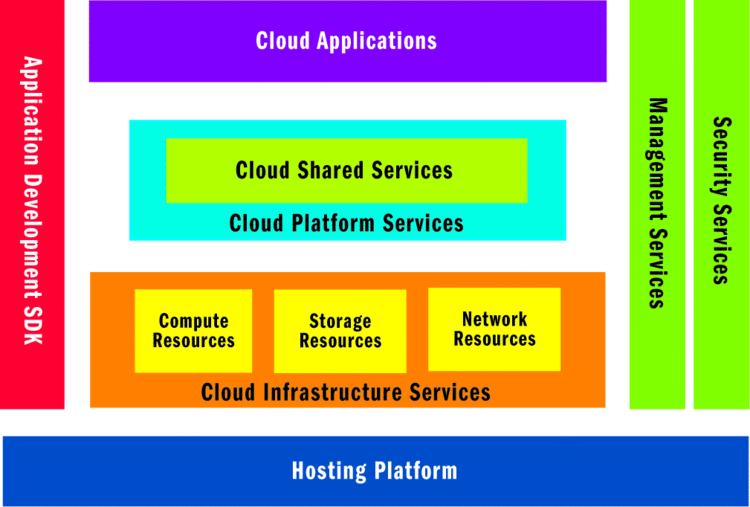
A cloud computing platform enables applications to be hosted in an Internet-accessible virtual environment that supplies the necessary hardware, software, network, and storage capacities and provides for security and reliability, removing much of the burden of purchasing and maintaining hardware and software in-house. In the cloud, you can develop, deploy, and manage applications as you have in the past and integrate these services to your on-premise applications. You pay only for the time, resources, and capacity you use while scaling up to accommodate the changing business needs.
In this article, I will examine the typical cloud platform architecture and some common architectural patterns, along with their implementation on the Windows Azure offering from Microsoft.
For more info..
Friday, August 21, 2009
VB and C# enhancements in VS 2010
Choosing a programming language is a personal choice that each programmer gets to make. It is akin to choosing a flavor of ice cream - there are many great options out there, but your favorite flavor is a matter of personal preference.
In Visual Studio 2010, we’ve made several enhancements to our two most popular languages, Visual Basic and C#, to give programmers all the tools they need to build great software no matter which language they prefer.
Visual Basic
The Visual Basic team focused on adding productivity features to the language so developers can get more done in fewer lines of code. The most common customer request for Visual Basic is to remove the underscore (“_”) character when breaking a code statement across multiple lines in most cases. Visual Basic 10 introduces implicit line continuation, which removes the need for the underscore character in most cases.
Function Filter(
ByVal customers As List(Of Customer),
ByVal orderCount As Integer
)
Dim query =
From c In customers
Where c.Orders.Count >
orderCount
Select c
Another new productivity feature is auto-implemented properties. With auto-implemented properties, lines of boiler-plate property implementation code can be replaced with simple one-line declarations. Previously, property declarations often looked like this:
Private _FavoriteFlavor As String = "Butter Pecan"
Property FavoriteFlavor() As String
Get
Return _FavoriteFlavor
End Get
Set(ByVal value As String)
_FavoriteFlavor = value
End Set
End Property
Private _FlavorList As New List(Of Flavor)
Property FlavorList() As List(Of Flavor)
Get
Return _FlavorList
End Get
Set(ByVal value As String)
_FlavorList = value
End Set
End Property
Now property declarations can be declared much more simply:
Property FavoriteFlavor As String = "Butter Pecan"
Property FlavorList As New List(Of Flavor)
Collection initializers and array literals are simpler as well. Collections can now be initialized when they’re declared, and the type of array literals is inferred by the compiler.
Dim toppings = New List(Of String) From
{
"sprinkles",
"chocolate chips",
"strawberries"
}
Dim cones = {"sugar cone", "waffle cone"} 'the type String() is inferred
Visual Basic 10.0 now has better support for lambdas. Lambdas can now contain expressions that don’t return a value, as the Sub keyword indicates below:
Array.ForEach(toppings, Sub(n) Console.WriteLine(n))
Sometimes you’d like to do more complex work inside a lambda declaration. Visual Basic 10.0 supports multiline lambdas. The compiler will infer parameter and return types where possible just like in regular lambdas.
Dim doubleDown = Function(n As String)
If n.StartsWith("s") Then
Return "extra " & n
Else
Return n
End If
End Function
Interoperating with dynamic language code such as Python and Ruby has become simpler in Visual Basic 10.0. For example, the following code snippet calls a method defined in a Python library “math.py”:
Dim mathLib As Object = python.UseFile("math.py")
Dim firstNumber = 44.2
Dim secondNumber = 9.5
mathLib.PowerOf(firstNumber, secondNumber)
C#
C# 4.0’s major themes are interoperability with dynamic programming paradigms and improved Office programmability. Dynamic lookup, a new feature in C# 4.0, allows you to use and manipulate an object from IronPython, IronRuby, JScript, the HTML DOM, or a standard .NET library in the same way, no matter where it came from. Language enhancements such as named and optional parameters and improved support for COM clients give C# developers who are working with Office APIs the same great experience that Visual Basic developers have enjoyed.
Adding the new dynamic keyword to your code allows its type to be resolved dynamically at runtime rather than statically at compile-time. This allows dynamic languages to expose their objects to C# in a way that feels natural to a C# programmer:
dynamic dynamicObject = GetDynamicObjectFromRuby();
dynamicObject.Foo(7);
dynamicObject.Property = "Property value";
dynamicObject[0] = "Indexed value";
Optional method parameters are familiar to Visual Basic and C++ programmers and are now available for C# programmers. Optional parameters are declared with a default value in the method signature, as follows:
private void CreateNewStudent(string name, int currentCredits = 0, int year = 1)
The method above can be called in any of the following ways:
CreateNewStudent("Chloe");
CreateNewStudent("Zoe", 16);
CreateNewStudent("Joey", 40, 2);
To omit the currentCredits parameter value but specify the year parameter, the new named arguments feature (highlighted) can be used. All of the following are also valid calls:
CreateNewStudent("Jill", year: 2);
CreateNewStudent(name: "Bill", currentCredits: 30, year: 2);
CreateNewStudent("Will", currentCredits: 4);
Named arguments are also a great way to write self-documenting calls to your existing methods, even if they don’t use optional parameters.
Learn More
Find out more about Visual Studio 2010’s language enhancements and download samples on the VB Futures site and the C# Futures site. To play with the new features, download and install Visual Studio Beta 1, then join the conversation.
Catch you soon with more updates... on VS 2010
In Visual Studio 2010, we’ve made several enhancements to our two most popular languages, Visual Basic and C#, to give programmers all the tools they need to build great software no matter which language they prefer.
Visual Basic
The Visual Basic team focused on adding productivity features to the language so developers can get more done in fewer lines of code. The most common customer request for Visual Basic is to remove the underscore (“_”) character when breaking a code statement across multiple lines in most cases. Visual Basic 10 introduces implicit line continuation, which removes the need for the underscore character in most cases.
Function Filter(
ByVal customers As List(Of Customer),
ByVal orderCount As Integer
)
Dim query =
From c In customers
Where c.Orders.Count >
orderCount
Select c
Another new productivity feature is auto-implemented properties. With auto-implemented properties, lines of boiler-plate property implementation code can be replaced with simple one-line declarations. Previously, property declarations often looked like this:
Private _FavoriteFlavor As String = "Butter Pecan"
Property FavoriteFlavor() As String
Get
Return _FavoriteFlavor
End Get
Set(ByVal value As String)
_FavoriteFlavor = value
End Set
End Property
Private _FlavorList As New List(Of Flavor)
Property FlavorList() As List(Of Flavor)
Get
Return _FlavorList
End Get
Set(ByVal value As String)
_FlavorList = value
End Set
End Property
Now property declarations can be declared much more simply:
Property FavoriteFlavor As String = "Butter Pecan"
Property FlavorList As New List(Of Flavor)
Collection initializers and array literals are simpler as well. Collections can now be initialized when they’re declared, and the type of array literals is inferred by the compiler.
Dim toppings = New List(Of String) From
{
"sprinkles",
"chocolate chips",
"strawberries"
}
Dim cones = {"sugar cone", "waffle cone"} 'the type String() is inferred
Visual Basic 10.0 now has better support for lambdas. Lambdas can now contain expressions that don’t return a value, as the Sub keyword indicates below:
Array.ForEach(toppings, Sub(n) Console.WriteLine(n))
Sometimes you’d like to do more complex work inside a lambda declaration. Visual Basic 10.0 supports multiline lambdas. The compiler will infer parameter and return types where possible just like in regular lambdas.
Dim doubleDown = Function(n As String)
If n.StartsWith("s") Then
Return "extra " & n
Else
Return n
End If
End Function
Interoperating with dynamic language code such as Python and Ruby has become simpler in Visual Basic 10.0. For example, the following code snippet calls a method defined in a Python library “math.py”:
Dim mathLib As Object = python.UseFile("math.py")
Dim firstNumber = 44.2
Dim secondNumber = 9.5
mathLib.PowerOf(firstNumber, secondNumber)
C#
C# 4.0’s major themes are interoperability with dynamic programming paradigms and improved Office programmability. Dynamic lookup, a new feature in C# 4.0, allows you to use and manipulate an object from IronPython, IronRuby, JScript, the HTML DOM, or a standard .NET library in the same way, no matter where it came from. Language enhancements such as named and optional parameters and improved support for COM clients give C# developers who are working with Office APIs the same great experience that Visual Basic developers have enjoyed.
Adding the new dynamic keyword to your code allows its type to be resolved dynamically at runtime rather than statically at compile-time. This allows dynamic languages to expose their objects to C# in a way that feels natural to a C# programmer:
dynamic dynamicObject = GetDynamicObjectFromRuby();
dynamicObject.Foo(7);
dynamicObject.Property = "Property value";
dynamicObject[0] = "Indexed value";
Optional method parameters are familiar to Visual Basic and C++ programmers and are now available for C# programmers. Optional parameters are declared with a default value in the method signature, as follows:
private void CreateNewStudent(string name, int currentCredits = 0, int year = 1)
The method above can be called in any of the following ways:
CreateNewStudent("Chloe");
CreateNewStudent("Zoe", 16);
CreateNewStudent("Joey", 40, 2);
To omit the currentCredits parameter value but specify the year parameter, the new named arguments feature (highlighted) can be used. All of the following are also valid calls:
CreateNewStudent("Jill", year: 2);
CreateNewStudent(name: "Bill", currentCredits: 30, year: 2);
CreateNewStudent("Will", currentCredits: 4);
Named arguments are also a great way to write self-documenting calls to your existing methods, even if they don’t use optional parameters.
Learn More
Find out more about Visual Studio 2010’s language enhancements and download samples on the VB Futures site and the C# Futures site. To play with the new features, download and install Visual Studio Beta 1, then join the conversation.
Catch you soon with more updates... on VS 2010
SQL AZURE - New Technology with big changes..
What is SQL Azure?
In short, SQL Azure is simply a Microsoft branding change. SQL Services and SQL Data Services are now known as Microsoft SQL Azure and SQL Azure Database. There are a few changes, but fundamentally Microsoft’s plans to extend SQL server capabilities in cloud as web-based services remain intact. SQL Azure will continue to deliver an integrated set of services for relational databases. The reporting, analytics and data synchronization with end-users and partners also remains unchanged. This makes it most appealing to current users of SQL Server.
Architecture
Some architectural changes have been introduced. While the basic foundation remains the same, support for certain languages and protocols has been discontinued. A relationship data model replaces the ACE (Authority, Container, Entity) data model. In the new model, customer applications gain access through TSQL over TDS. The development environment of those currently using an on-premise SQL server database will continue to be familiar and existing expertise, applications and tools are still applicable.
Programming Model
As a fully relational data model in the cloud has replaced the entity based data model, programming for the new model needs a shift from the ACE programming model to a relational data module, but many SQL Server-like concepts still apply. To access data in the cloud, existing Transact-SQL code can still be used. Developers will need to modify their current Transact-SQL code to interact with the fully relational cloud database service. Current applications may need modification and, in some cases, new applications will need to be created. Existing data access frameworks, such as ADO.NET Data Services can be used without much effort for additional REST and SOAP services.
SQL Azure vs. SQL Server
SQL Server database technologies were used to build SQL Azure. Specifically, the technologies used in critical enterprise and web applications are included. The extensive data platform of SQL Server is capable of handling all data types and the SQL Azure platform introduces many associated capabilities. New relational functionalities are included and extended as services in the cloud .
Availability, self-management and ease-of-use are the highlights of the new service. While only the core RDBMS capabilities of the full SQL Server data platform are presently included, more services are expected to be introduced in the future. Reporting, analytics and ETL will no doubt be available over time. As SQL Server and SQL Azure share the same technologies, bilateral innovation can also be anticipated.
SQL Azure Database
The SQL Azure database service offers a scalable and distributed database hosted in the cloud, and therefore highly available. As HA, backup and recovery, geo-distribution and disaster recovery are built-in, developers do not need to manage any software, but in the case of a dedicated hosted database, they will still be responsible for database software, i.e. for the installation and tasks related to OS and database software.
Windows Azure Table storage
Windows Azure Table storage, offered by SQL Azure Database service, provides a non-relational, scalable, simple structured data storage solution in the Cloud. Structured, semi-structured and unstructured data can be processed and analyzed. As Windows Azure applications are supported in the SQL Azure Database service, it is possible to combine services in accordance with your needs.
SQL Azure Development
SQL Azure’s relational database service supports the T-SQL (Transact-SQL) over TDS (Tabular Data Stream) protocol. The relational data model in the cloud can therefore be used together with current T-SQL developments. The new distributed functionality of the SQL Azure Database in the cloud should provide development cost-savings, as existing applications, tools and expertise can be incorporated. The ability to use the traditional RDBMS data model in the cloud implies that developers should be able to use current interfaces to build new applications, and previous investments in development, training and tools should hold their value.
(image courtesy of http://www.microsoft.com/azure/howdoesitwork.mspx)
Current SOAP and REST based ACE programming models are no longer supported in SQL Azure, but building custom services with ADO.NET Data Services does provide a relatively simple solution for those requiring REST access to their SQL Azure data. For REST based programming model users, who simply require non-relational structured data storage, Windows Azure storage should prove to be an adequate solution.
Visual Studio can be used to create and modify applications for SQL Azure. Additionally, for developing new applications, ASP.NET controls and tools are a useful solution. Web based management tools, to access and manage data in the cloud, and tools and documentation supporting further programming languages, are expected to be introduced in the near future.
In short, SQL Azure is simply a Microsoft branding change. SQL Services and SQL Data Services are now known as Microsoft SQL Azure and SQL Azure Database. There are a few changes, but fundamentally Microsoft’s plans to extend SQL server capabilities in cloud as web-based services remain intact. SQL Azure will continue to deliver an integrated set of services for relational databases. The reporting, analytics and data synchronization with end-users and partners also remains unchanged. This makes it most appealing to current users of SQL Server.
Architecture
Some architectural changes have been introduced. While the basic foundation remains the same, support for certain languages and protocols has been discontinued. A relationship data model replaces the ACE (Authority, Container, Entity) data model. In the new model, customer applications gain access through TSQL over TDS. The development environment of those currently using an on-premise SQL server database will continue to be familiar and existing expertise, applications and tools are still applicable.
Programming Model
As a fully relational data model in the cloud has replaced the entity based data model, programming for the new model needs a shift from the ACE programming model to a relational data module, but many SQL Server-like concepts still apply. To access data in the cloud, existing Transact-SQL code can still be used. Developers will need to modify their current Transact-SQL code to interact with the fully relational cloud database service. Current applications may need modification and, in some cases, new applications will need to be created. Existing data access frameworks, such as ADO.NET Data Services can be used without much effort for additional REST and SOAP services.
SQL Azure vs. SQL Server
SQL Server database technologies were used to build SQL Azure. Specifically, the technologies used in critical enterprise and web applications are included. The extensive data platform of SQL Server is capable of handling all data types and the SQL Azure platform introduces many associated capabilities. New relational functionalities are included and extended as services in the cloud .
Availability, self-management and ease-of-use are the highlights of the new service. While only the core RDBMS capabilities of the full SQL Server data platform are presently included, more services are expected to be introduced in the future. Reporting, analytics and ETL will no doubt be available over time. As SQL Server and SQL Azure share the same technologies, bilateral innovation can also be anticipated.
SQL Azure Database
The SQL Azure database service offers a scalable and distributed database hosted in the cloud, and therefore highly available. As HA, backup and recovery, geo-distribution and disaster recovery are built-in, developers do not need to manage any software, but in the case of a dedicated hosted database, they will still be responsible for database software, i.e. for the installation and tasks related to OS and database software.
Windows Azure Table storage
Windows Azure Table storage, offered by SQL Azure Database service, provides a non-relational, scalable, simple structured data storage solution in the Cloud. Structured, semi-structured and unstructured data can be processed and analyzed. As Windows Azure applications are supported in the SQL Azure Database service, it is possible to combine services in accordance with your needs.
SQL Azure Development
SQL Azure’s relational database service supports the T-SQL (Transact-SQL) over TDS (Tabular Data Stream) protocol. The relational data model in the cloud can therefore be used together with current T-SQL developments. The new distributed functionality of the SQL Azure Database in the cloud should provide development cost-savings, as existing applications, tools and expertise can be incorporated. The ability to use the traditional RDBMS data model in the cloud implies that developers should be able to use current interfaces to build new applications, and previous investments in development, training and tools should hold their value.
(image courtesy of http://www.microsoft.com/azure/howdoesitwork.mspx)
Current SOAP and REST based ACE programming models are no longer supported in SQL Azure, but building custom services with ADO.NET Data Services does provide a relatively simple solution for those requiring REST access to their SQL Azure data. For REST based programming model users, who simply require non-relational structured data storage, Windows Azure storage should prove to be an adequate solution.
Visual Studio can be used to create and modify applications for SQL Azure. Additionally, for developing new applications, ASP.NET controls and tools are a useful solution. Web based management tools, to access and manage data in the cloud, and tools and documentation supporting further programming languages, are expected to be introduced in the near future.
Tuesday, August 4, 2009
WCF 4.0 Features: Part I
Objective:
This article is first part of multi series article on WCF 4.0. This article will list all the new feature of WCF and also will explain in detail Dynamic Service and End Point Discovery feature of WCF 4.0.
A Note:
On 22nd of July 2009, I got a very sweet and new gift from my GOD. So I thought why I should not start something which is new for me on this auspicious day? And I started WCF 4.0. I welcome that gift in my life and welcome WCF4.0 too in my learning. Thanks God.
What are the new in WCF 4.0?
I am listing here, new features in WCF 4.0
Dynamic Service and End Point discovery
Intermediate Routing Pattern ( Generic Routing Services)
Discovery announcement
Simplified Configuration
Protocol bridging and Fault tolerance
Standard End Points.
.svc-less activation of REST services or making REST URI nice.
Readers Note
I will discuss details of each feature in subsequent articles. This article is emphasizing on Dynamic Service and End Point discovery. So please tune in.
Dynamic Service and End Point discovery
Problem:
People say; you need to know only ABC of a service to expose End Point of that service. And client or service consumer needs to know only End Point to consume the service. But wait for a while here, and think; what if? Binding need to change at the service side from basic to WS over HTTP, This is very basic change but to accommodate this client has to update the service again. And this is very much error prone. It is very tedious task to update client about all the basic frequent change at the service side. To solve this issue, there should be some mechanism and that is called End Point Discovery or Dynamic Service.
In absolute technical words
WCF 4.0 supports WS - Discovery standard or protocol.
WS-Discovery Standard
This is a multicast protocol that issues SOAP message over UDP,
WS-Discovery is a Standard that defines a lightweight discovery mechanism for discovering services based on multicast messages. It enables a service to send a Hello announcement message when it is initialized and a Bye message when is removed from the network.
Client or consumer can discover services by multicasting a Probe message to which a service can reply with a ProbeMatch message containing the information necessary to contact the service.
Client or consumer can find services that have changed endpoint by issuing a Resolve message to which respond with a ResolveMatchmessage.
So, we can say WS - Discovery is a UDP based multicast message exchange. This message receives End Point information from Service and uses this as discovery information. Client uses discovery information to discover the available service on the network.
WCF Service Discovery API
WCF provides, WCF Discovery API for dynamic publish and discovery of web service using WS - Discovery protocol. This API helps service to publish them and helps client to find service on the network.
Modes:
Managed Mode:
In managed mode there is a centralized server called a discovery proxy that services use to publish themselves and clients use to retrieve information about available services.
When a new service starts up it sends an announcement message to the discovery proxy.
The discovery proxy saves information about each available service to storage.
When a client must search for a service it sends a Probe request to the discovery proxy and it determines whether any of the services that have been published match the request.
If there are matches the discovery proxy sends a ProbeMatch response back to the client.
The client can then contact the service directly using the service information returned from the proxy.
Ad-Hoc Mode:
There is no centralized server.
Service announcements and client requests are sent in a multicast fashion.
If a service is configured to send out a Hello announcement on start up, it sends it out over a well-known, multicast address using the UDP protocol.
Therefore, clients have to actively listen for these announcements and process them accordingly.
When a client issues a Probe request for a service it is also sent over the network using a multicast protocol.
Each service that receives the request determines whether it matches the criteria in the Probe request and responds directly to the client with a ProbeMatch message if the service matches the criteria specified in the Probe request.
Sample
In this sample, we will create a very basic service and at the client side, first client will discover the service in Ad-Hoc mode and then consume that.
To run and go through this sample, you need Visual Studio 2010 Beta.
To make a service discoverable, a ServiceDiscoveryBehavior must be added to the service host and a discovery endpoint must be added to specify where to listen for and send discovery message
Step 1
Open VS2010. Create a new project. Select project type as Web. From Web Project type choose WCF Service Application Project template.
Step 2
Delete all the code which is generated by Visual studio. After deleting Contract and Service Implantation is as follows.
IService1.cs
using System;
using System.Collections.Generic;
using System.Linq;
using System.Runtime.Serialization;
using System.ServiceModel;
using System.ServiceModel.Web;
using System.Text;
namespace WcfService1
{
[ServiceContract]
public interface IService1
{
[OperationContract]
string GetMessage(string msg);
}
}
Service1.cs
using System;
using System.Collections.Generic;
using System.Linq;
using System.Runtime.Serialization;
using System.ServiceModel;
using System.ServiceModel.Web;
using System.Text;
namespace WcfService1
{
public class Service1 : IService1
{
public string GetMessage(string msg)
{
return msg;
}
}
}
The above is simple Service Contract and implantation of that.
Step 3:
Open Web.Config file. And modify the System.ServiceModel. Add the code which is highlighted below.
Web.Config
Explanation of Config file
One new End Point is being added.
Kind of newly added End Point is udpDiscoveryEndpoint.
This End Point will be used to discover the service.
ServiceDiscovery behavior is also get added.
Step 4:
Press F5 to run the service. Service will get hosted in ASP.Net web server.
Step 5:
Add a new console project in solution.
Step 6:
Add Reference of System.ServiceModel.Discovery.dll in console project.
Step 7:
Add namespace using System.ServiceModel.Discovery;
using System;
using System.Collections.Generic;
using System.Linq;
using System.Text;
using ConsoleApplication1.ServiceReference1;
using System.ServiceModel;
using System.ServiceModel.Discovery;
namespace ConsoleApplication1
{
class Program
{
static void Main(string[] args)
{
DiscoveryClient discoverclient = new DiscoveryClient(new UdpDiscoveryEndpoint());
FindResponse response = discoverclient.Find(new FindCriteria(typeof(IService1)));
EndpointAddress address = response.Endpoints[0].Address;
Service1Client client = new Service1Client(new WSHttpBinding(), address);
string str= client.GetMessage("Hello WCF 4 ");
Console.WriteLine(str);
Console.ReadKey(true);
}
}
}
Explanation of the code
We are making object of DiscoveryClient class. This class is user to discover available service.
In constructor of this class, we are passing UdpDiscoveryEndPoint of the service.
Then we are calling Find method with contract name as argument to get FindResponse.
Now FindResponse variable having all the available address for contract passed in Find method.
We are creating the client proxy and passing discovered address as argument.
Calling the service operation on the client proxy.
Output:
Conclusion:
In this article, I talked about what are the new features in WCF 4.0. I went into details of Dynamic Service and End Point Discovery. In later articles, I will cover in detail other features as well. Till then, thanks for reading.
Happy Coding!
This article is first part of multi series article on WCF 4.0. This article will list all the new feature of WCF and also will explain in detail Dynamic Service and End Point Discovery feature of WCF 4.0.
A Note:
On 22nd of July 2009, I got a very sweet and new gift from my GOD. So I thought why I should not start something which is new for me on this auspicious day? And I started WCF 4.0. I welcome that gift in my life and welcome WCF4.0 too in my learning. Thanks God.
What are the new in WCF 4.0?
I am listing here, new features in WCF 4.0
Dynamic Service and End Point discovery
Intermediate Routing Pattern ( Generic Routing Services)
Discovery announcement
Simplified Configuration
Protocol bridging and Fault tolerance
Standard End Points.
.svc-less activation of REST services or making REST URI nice.
Readers Note
I will discuss details of each feature in subsequent articles. This article is emphasizing on Dynamic Service and End Point discovery. So please tune in.
Dynamic Service and End Point discovery
Problem:
People say; you need to know only ABC of a service to expose End Point of that service. And client or service consumer needs to know only End Point to consume the service. But wait for a while here, and think; what if? Binding need to change at the service side from basic to WS over HTTP, This is very basic change but to accommodate this client has to update the service again. And this is very much error prone. It is very tedious task to update client about all the basic frequent change at the service side. To solve this issue, there should be some mechanism and that is called End Point Discovery or Dynamic Service.
In absolute technical words
WCF 4.0 supports WS - Discovery standard or protocol.
WS-Discovery Standard
This is a multicast protocol that issues SOAP message over UDP,
WS-Discovery is a Standard that defines a lightweight discovery mechanism for discovering services based on multicast messages. It enables a service to send a Hello announcement message when it is initialized and a Bye message when is removed from the network.
Client or consumer can discover services by multicasting a Probe message to which a service can reply with a ProbeMatch message containing the information necessary to contact the service.
Client or consumer can find services that have changed endpoint by issuing a Resolve message to which respond with a ResolveMatchmessage.
So, we can say WS - Discovery is a UDP based multicast message exchange. This message receives End Point information from Service and uses this as discovery information. Client uses discovery information to discover the available service on the network.
WCF Service Discovery API
WCF provides, WCF Discovery API for dynamic publish and discovery of web service using WS - Discovery protocol. This API helps service to publish them and helps client to find service on the network.
Modes:
Managed Mode:
In managed mode there is a centralized server called a discovery proxy that services use to publish themselves and clients use to retrieve information about available services.
When a new service starts up it sends an announcement message to the discovery proxy.
The discovery proxy saves information about each available service to storage.
When a client must search for a service it sends a Probe request to the discovery proxy and it determines whether any of the services that have been published match the request.
If there are matches the discovery proxy sends a ProbeMatch response back to the client.
The client can then contact the service directly using the service information returned from the proxy.
Ad-Hoc Mode:
There is no centralized server.
Service announcements and client requests are sent in a multicast fashion.
If a service is configured to send out a Hello announcement on start up, it sends it out over a well-known, multicast address using the UDP protocol.
Therefore, clients have to actively listen for these announcements and process them accordingly.
When a client issues a Probe request for a service it is also sent over the network using a multicast protocol.
Each service that receives the request determines whether it matches the criteria in the Probe request and responds directly to the client with a ProbeMatch message if the service matches the criteria specified in the Probe request.
Sample
In this sample, we will create a very basic service and at the client side, first client will discover the service in Ad-Hoc mode and then consume that.
To run and go through this sample, you need Visual Studio 2010 Beta.
To make a service discoverable, a ServiceDiscoveryBehavior must be added to the service host and a discovery endpoint must be added to specify where to listen for and send discovery message
Step 1
Open VS2010. Create a new project. Select project type as Web. From Web Project type choose WCF Service Application Project template.
Step 2
Delete all the code which is generated by Visual studio. After deleting Contract and Service Implantation is as follows.
IService1.cs
using System;
using System.Collections.Generic;
using System.Linq;
using System.Runtime.Serialization;
using System.ServiceModel;
using System.ServiceModel.Web;
using System.Text;
namespace WcfService1
{
[ServiceContract]
public interface IService1
{
[OperationContract]
string GetMessage(string msg);
}
}
Service1.cs
using System;
using System.Collections.Generic;
using System.Linq;
using System.Runtime.Serialization;
using System.ServiceModel;
using System.ServiceModel.Web;
using System.Text;
namespace WcfService1
{
public class Service1 : IService1
{
public string GetMessage(string msg)
{
return msg;
}
}
}
The above is simple Service Contract and implantation of that.
Step 3:
Open Web.Config file. And modify the System.ServiceModel. Add the code which is highlighted below.
Web.Config
Explanation of Config file
One new End Point is being added.
Kind of newly added End Point is udpDiscoveryEndpoint.
This End Point will be used to discover the service.
ServiceDiscovery behavior is also get added.
Step 4:
Press F5 to run the service. Service will get hosted in ASP.Net web server.
Step 5:
Add a new console project in solution.
Step 6:
Add Reference of System.ServiceModel.Discovery.dll in console project.
Step 7:
Add namespace using System.ServiceModel.Discovery;
using System;
using System.Collections.Generic;
using System.Linq;
using System.Text;
using ConsoleApplication1.ServiceReference1;
using System.ServiceModel;
using System.ServiceModel.Discovery;
namespace ConsoleApplication1
{
class Program
{
static void Main(string[] args)
{
DiscoveryClient discoverclient = new DiscoveryClient(new UdpDiscoveryEndpoint());
FindResponse response = discoverclient.Find(new FindCriteria(typeof(IService1)));
EndpointAddress address = response.Endpoints[0].Address;
Service1Client client = new Service1Client(new WSHttpBinding(), address);
string str= client.GetMessage("Hello WCF 4 ");
Console.WriteLine(str);
Console.ReadKey(true);
}
}
}
Explanation of the code
We are making object of DiscoveryClient class. This class is user to discover available service.
In constructor of this class, we are passing UdpDiscoveryEndPoint of the service.
Then we are calling Find method with contract name as argument to get FindResponse.
Now FindResponse variable having all the available address for contract passed in Find method.
We are creating the client proxy and passing discovered address as argument.
Calling the service operation on the client proxy.
Output:
Conclusion:
In this article, I talked about what are the new features in WCF 4.0. I went into details of Dynamic Service and End Point Discovery. In later articles, I will cover in detail other features as well. Till then, thanks for reading.
Happy Coding!
Subscribe to:
Posts (Atom)